Class: Google::Apis::ChatV1::GoogleAppsCardV1OnClick
- Inherits:
-
Object
- Object
- Google::Apis::ChatV1::GoogleAppsCardV1OnClick
- Includes:
- Google::Apis::Core::Hashable, Google::Apis::Core::JsonObjectSupport
- Defined in:
- lib/google/apis/chat_v1/classes.rb,
lib/google/apis/chat_v1/representations.rb,
lib/google/apis/chat_v1/representations.rb
Overview
Represents how to respond when users click an interactive element on a card, such as a button. Google Workspace Add-ons and Chat apps:
Instance Attribute Summary collapse
-
#action ⇒ Google::Apis::ChatV1::GoogleAppsCardV1Action
An action that describes the behavior when the form is submitted.
-
#card ⇒ Google::Apis::ChatV1::GoogleAppsCardV1Card
A card interface displayed in a Google Chat message or Google Workspace Add-on.
-
#open_dynamic_link_action ⇒ Google::Apis::ChatV1::GoogleAppsCardV1Action
An action that describes the behavior when the form is submitted.
-
#open_link ⇒ Google::Apis::ChatV1::GoogleAppsCardV1OpenLink
Represents an
onClickevent that opens a hyperlink.
Instance Method Summary collapse
-
#initialize(**args) ⇒ GoogleAppsCardV1OnClick
constructor
A new instance of GoogleAppsCardV1OnClick.
-
#update!(**args) ⇒ Object
Update properties of this object.
Constructor Details
#initialize(**args) ⇒ GoogleAppsCardV1OnClick
Returns a new instance of GoogleAppsCardV1OnClick.
2470 2471 2472 |
# File 'lib/google/apis/chat_v1/classes.rb', line 2470 def initialize(**args) update!(**args) end |
Instance Attribute Details
#action ⇒ Google::Apis::ChatV1::GoogleAppsCardV1Action
An action that describes the behavior when the form is submitted. For example,
you can invoke an Apps Script script to handle the form. If the action is
triggered, the form values are sent to the server. Google Workspace Add-ons
and Chat apps:
Corresponds to the JSON property action
2426 2427 2428 |
# File 'lib/google/apis/chat_v1/classes.rb', line 2426 def action @action end |
#card ⇒ Google::Apis::ChatV1::GoogleAppsCardV1Card
A card interface displayed in a Google Chat message or Google Workspace Add-on.
Cards support a defined layout, interactive UI elements like buttons, and
rich media like images. Use cards to present detailed information, gather
information from users, and guide users to take a next step. Card builder To learn how to build cards,
see the following documentation: * For Google Chat apps, see Design the
components of a card or dialog. * For Google Workspace Add-ons, see Card-
based interfaces. Example: Card message for a Google Chat app 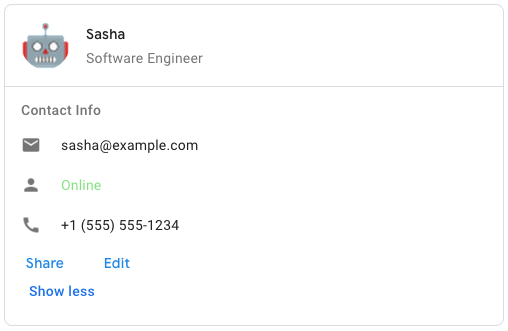 To create the sample card message in Google Chat, use the following JSON:
 `
"cardsV2": [ ` "cardId": "unique-card-id", "card": ` "header": ` "title": "
Sasha", "subtitle": "Software Engineer", "imageUrl": "https://developers.
google.com/workspace/chat/images/quickstart-app-avatar.png", "imageType": "
CIRCLE", "imageAltText": "Avatar for Sasha" `, "sections": [ ` "header": "
Contact Info", "collapsible": true, "uncollapsibleWidgetsCount": 1, "widgets":
[ ` "decoratedText": ` "startIcon": ` "knownIcon": "EMAIL" `, "text": "sasha@
example.com" ` `, ` "decoratedText": ` "startIcon": ` "knownIcon": "PERSON" `,
"text": "Online" ` `, ` "decoratedText": ` "startIcon": ` "knownIcon": "PHONE"
`, "text": "+1 (555) 555-1234" ` `, ` "buttonList": ` "buttons": [ ` "text": "
Share", "onClick": ` "openLink": ` "url": "https://example.com/share" ` ` `, `
"text": "Edit", "onClick": ` "action": ` "function": "goToView", "parameters":
[ ` "key": "viewType", "value": "EDIT" ` ] ` ` ` ] ` ` ] ` ] ` ` ] `
Corresponds to the JSON property card
2454 2455 2456 |
# File 'lib/google/apis/chat_v1/classes.rb', line 2454 def card @card end |
#open_dynamic_link_action ⇒ Google::Apis::ChatV1::GoogleAppsCardV1Action
An action that describes the behavior when the form is submitted. For example,
you can invoke an Apps Script script to handle the form. If the action is
triggered, the form values are sent to the server. Google Workspace Add-ons
and Chat apps:
Corresponds to the JSON property openDynamicLinkAction
2462 2463 2464 |
# File 'lib/google/apis/chat_v1/classes.rb', line 2462 def open_dynamic_link_action @open_dynamic_link_action end |
#open_link ⇒ Google::Apis::ChatV1::GoogleAppsCardV1OpenLink
Represents an onClick event that opens a hyperlink. Google Workspace Add-
ons and Chat apps:
Corresponds to the JSON property openLink
2468 2469 2470 |
# File 'lib/google/apis/chat_v1/classes.rb', line 2468 def open_link @open_link end |
Instance Method Details
#update!(**args) ⇒ Object
Update properties of this object
2475 2476 2477 2478 2479 2480 |
# File 'lib/google/apis/chat_v1/classes.rb', line 2475 def update!(**args) @action = args[:action] if args.key?(:action) @card = args[:card] if args.key?(:card) @open_dynamic_link_action = args[:open_dynamic_link_action] if args.key?(:open_dynamic_link_action) @open_link = args[:open_link] if args.key?(:open_link) end |