Class SpacesResource.MessagesResource
The "messages" collection of methods.
Inherited Members
Namespace: Google.Apis.HangoutsChat.v1
Assembly: Google.Apis.HangoutsChat.v1.dll
Syntax
public class SpacesResource.MessagesResourceConstructors
MessagesResource(IClientService)
Constructs a new resource.
Declaration
public MessagesResource(IClientService service)Parameters
| Type | Name | Description |
|---|---|---|
| IClientService | service |
Properties
Attachments
Gets the Attachments resource.
Declaration
public virtual SpacesResource.MessagesResource.AttachmentsResource Attachments { get; }Property Value
| Type | Description |
|---|---|
| SpacesResource.MessagesResource.AttachmentsResource |
Reactions
Gets the Reactions resource.
Declaration
public virtual SpacesResource.MessagesResource.ReactionsResource Reactions { get; }Property Value
| Type | Description |
|---|---|
| SpacesResource.MessagesResource.ReactionsResource |
Methods
Create(Message, string)
Creates a message in a Google Chat space. For an example, see Send a
message. Supports the following types of
authentication: - App
authentication with the
authorization scope: - https://www.googleapis.com/auth/chat.bot - User
authentication with one
of the following authorization scopes: - https://www.googleapis.com/auth/chat.messages.create -
https://www.googleapis.com/auth/chat.messages - https://www.googleapis.com/auth/chat.import (import
mode spaces only) Chat attributes the message sender differently depending on the type of authentication
that you use in your request. The following image shows how Chat attributes a message when you use app
authentication. Chat displays the Chat app as the message sender. The content of the message can contain
text (text), cards (cardsV2), and accessory widgets (accessoryWidgets). 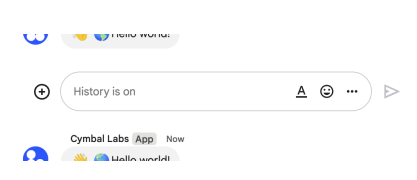 The following
image shows how Chat attributes a message when you use user authentication. Chat displays the user as
the message sender and attributes the Chat app to the message by displaying its name. The content of
message can only contain text (
The following
image shows how Chat attributes a message when you use user authentication. Chat displays the user as
the message sender and attributes the Chat app to the message by displaying its name. The content of
message can only contain text (text). 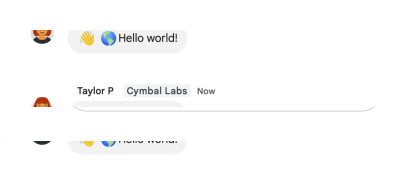 The maximum
message size, including the message contents, is 32,000 bytes. For
webhook requests, the response
doesn't contain the full message. The response only populates the
The maximum
message size, including the message contents, is 32,000 bytes. For
webhook requests, the response
doesn't contain the full message. The response only populates the name and thread.name fields in
addition to the information that was in the request.
Declaration
public virtual SpacesResource.MessagesResource.CreateRequest Create(Message body, string parent)Parameters
| Type | Name | Description |
|---|---|---|
| Message | body | The body of the request. |
| string | parent | Required. The resource name of the space in which to create a message. Format: |
Returns
| Type | Description |
|---|---|
| SpacesResource.MessagesResource.CreateRequest |
Delete(string)
Deletes a message. For an example, see Delete a
message. Supports the following types of
authentication: - App
authentication with the
authorization scope: - https://www.googleapis.com/auth/chat.bot - User
authentication with one
of the following authorization scopes: - https://www.googleapis.com/auth/chat.messages -
https://www.googleapis.com/auth/chat.import (import mode spaces only) When using app authentication,
requests can only delete messages created by the calling Chat app.
Declaration
public virtual SpacesResource.MessagesResource.DeleteRequest Delete(string name)Parameters
| Type | Name | Description |
|---|---|---|
| string | name | Required. Resource name of the message. Format: |
Returns
| Type | Description |
|---|---|
| SpacesResource.MessagesResource.DeleteRequest |
Get(string)
Returns details about a message. For an example, see Get details about a
message. Supports the following types of
authentication: - App
authentication with one
of the following authorization scopes: - https://www.googleapis.com/auth/chat.bot: When using this
authorization scope, this method returns details about a message the Chat app has access to, like direct
messages and slash commands that invoke
the Chat app. - https://www.googleapis.com/auth/chat.app.messages.readonly with administrator
approval. When using this authentication scope, this
method returns details about a public message in a space. - User
authentication with one
of the following authorization scopes: - https://www.googleapis.com/auth/chat.messages.readonly -
https://www.googleapis.com/auth/chat.messages Note: Might return a message from a blocked member or
space.
Declaration
public virtual SpacesResource.MessagesResource.GetRequest Get(string name)Parameters
| Type | Name | Description |
|---|---|---|
| string | name | Required. Resource name of the message. Format: |
Returns
| Type | Description |
|---|---|
| SpacesResource.MessagesResource.GetRequest |
List(string)
Lists messages in a space that the caller is a member of, including messages from blocked members and
spaces. System messages, like those announcing new space members, aren't included. If you list messages
from a space with no messages, the response is an empty object. When using a REST/HTTP interface, the
response contains an empty JSON object, {}. For an example, see List
messages. Supports the
following types of
authentication: - App
authentication with
administrator approval with the authorization scope: -
https://www.googleapis.com/auth/chat.app.messages.readonly. When using this authentication scope, this
method only returns public messages in a space. It doesn't include private messages. - User
authentication with one
of the following authorization scopes: - https://www.googleapis.com/auth/chat.messages.readonly -
https://www.googleapis.com/auth/chat.messages - https://www.googleapis.com/auth/chat.import (import
mode spaces only)
Declaration
public virtual SpacesResource.MessagesResource.ListRequest List(string parent)Parameters
| Type | Name | Description |
|---|---|---|
| string | parent | Required. The resource name of the space to list messages from. Format: |
Returns
| Type | Description |
|---|---|
| SpacesResource.MessagesResource.ListRequest |
Patch(Message, string)
Updates a message. There's a difference between the patch and update methods. The patch method
uses a patch request while the update method uses a put request. We recommend using the patch
method. For an example, see Update a
message. Supports the following types of
authentication: - App
authentication with the
authorization scope: - https://www.googleapis.com/auth/chat.bot - User
authentication with one
of the following authorization scopes: - https://www.googleapis.com/auth/chat.messages -
https://www.googleapis.com/auth/chat.import (import mode spaces only) When using app authentication,
requests can only update messages created by the calling Chat app.
Declaration
public virtual SpacesResource.MessagesResource.PatchRequest Patch(Message body, string name)Parameters
| Type | Name | Description |
|---|---|---|
| Message | body | The body of the request. |
| string | name | Identifier. Resource name of the message. Format: |
Returns
| Type | Description |
|---|---|
| SpacesResource.MessagesResource.PatchRequest |
Search(SearchMessagesRequest, string)
Searches for messages in Google Chat that the calling user has access to. Returns a list of messages
matching the search criteria. To search across all spaces the user has access to, set parent to
spaces/-. Using any other value for parent results in an INVALID_ARGUMENT error. The returned
messages have their name field populated with the full resource name, which includes the specific
space in which the message resides. This API doesn't return all message types. The types of messages
listed below aren't included in the response. Use ListMessages to list all messages. - Private Messages
that are visible to the authenticated user. - Messages posted by Chat apps in spaces or group chats. -
Messages in a Chat app DM. - Messages from blocked users. - Messages in spaces that the caller has
muted. Requires user
authentication with one
of the following authorization
scopes: -
https://www.googleapis.com/auth/chat.messages.readonly -
https://www.googleapis.com/auth/chat.messages
Declaration
public virtual SpacesResource.MessagesResource.SearchRequest Search(SearchMessagesRequest body, string parent)Parameters
| Type | Name | Description |
|---|---|---|
| SearchMessagesRequest | body | The body of the request. |
| string | parent | Required. The resource name of the space to search within. To search across all spaces the user has
access to, set this field to |
Returns
| Type | Description |
|---|---|
| SpacesResource.MessagesResource.SearchRequest |
Update(Message, string)
Updates a message. There's a difference between the patch and update methods. The patch method
uses a patch request while the update method uses a put request. We recommend using the patch
method. For an example, see Update a
message. Supports the following types of
authentication: - App
authentication with the
authorization scope: - https://www.googleapis.com/auth/chat.bot - User
authentication with one
of the following authorization scopes: - https://www.googleapis.com/auth/chat.messages -
https://www.googleapis.com/auth/chat.import (import mode spaces only) When using app authentication,
requests can only update messages created by the calling Chat app.
Declaration
public virtual SpacesResource.MessagesResource.UpdateRequest Update(Message body, string name)Parameters
| Type | Name | Description |
|---|---|---|
| Message | body | The body of the request. |
| string | name | Identifier. Resource name of the message. Format: |
Returns
| Type | Description |
|---|---|
| SpacesResource.MessagesResource.UpdateRequest |